
Things to Know About Web Scraping with Python
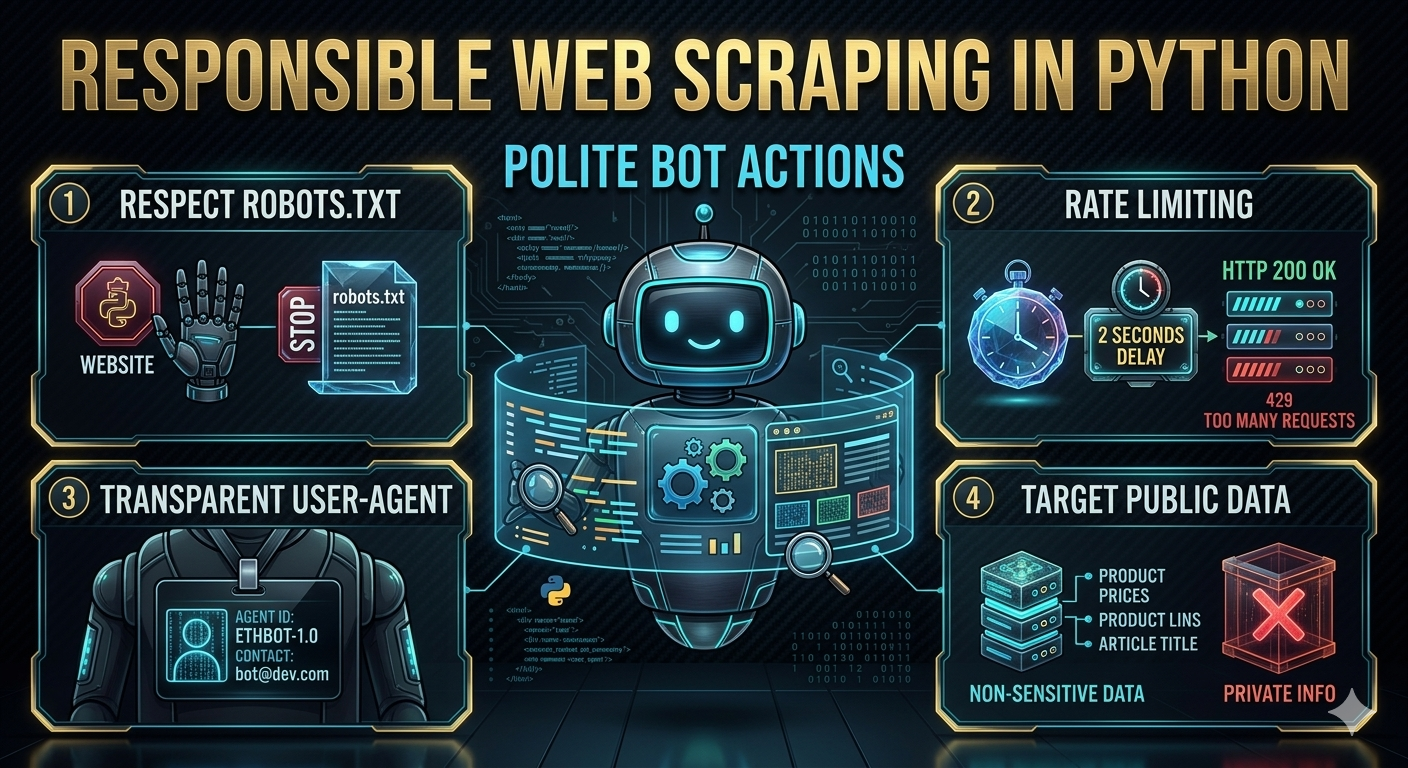
Last week I attended the AI Agent Conference in NYC and I noticed there were a quite few vendor booths for services offering public data that they’ve scraped from the web (or will scrape in real time) to make available to AI agents. It makes sense when you think about it - LLM’s and AI agents need access to current + structured data to be useful, and web scraping is a popular way how folks get that data at scale.
It got me thinking about how fundamental web scraping has become, not just for AI but for all kinds of projects. I started playing around with scraping years ago when I wanted player stats to get ready for my Fantasy Football draft, and over the years it’s become one of those skills I reach for constantly. Need to pull product data for a side project? Scrape it. Want to monitor prices across marketplaces? Scrape it. Need to build a dataset that doesn’t exist as a nice API? You guessed it.
Web scraping is one of those things that sounds simple on the surface - just grab the HTML and parse it, right? But anyone who’s spent real time doing it knows the rabbit hole goes deep. You’ve got JavaScript-rendered pages, rate limiting, anti-bot measures, changing DOM structures, and the ever-present question of whether you’re being a good citizen of the internet. I wanted to put together a thorough guide covering the tools and techniques I’ve found most useful over the years.
The basics
At its core, web scraping is just making HTTP requests and extracting data from the responses. The simplest version looks like this:
1
2
3
4
5
6
7
8
9
10
11
import requests
from bs4 import BeautifulSoup

url = "https://example.com/products"
response = requests.get(url)
soup = BeautifulSoup(response.text, "html.parser")

for item in soup.select(".product-card"):
    name = item.select_one(".product-name").text.strip()
    price = item.select_one(".product-price").text.strip()
    print(f"{name}: {price}")
That’s the hello world of scraping. You make a GET request with the requests library, pass the HTML into BeautifulSoup, and use CSS selectors to find the elements you care about. For simple, static HTML pages, this is all you need.
But most interesting websites aren’t that simple.
Choosing the right tool for the job
Over the years I’ve settled on a few go-to libraries depending on what I’m dealing with. Here’s how I think about it:
requests + BeautifulSoup
This is my default starting point. It’s lightweight, fast, and handles the majority of cases where the content you want is in the initial HTML response. I’d estimate 60-70% of my scraping projects start and end here.
Best for:
- Static HTML pages
- Sites with server-rendered content
- APIs that return HTML fragments
- Quick one-off scripts
Install them with:
1
pip install requests beautifulsoup4 lxml
I always install lxml as the parser - it’s significantly faster than the default html.parser and handles malformed HTML more gracefully:
1
soup = BeautifulSoup(response.text, "lxml")
Selenium
When a site relies heavily on JavaScript to render content, requests + BeautifulSoup won’t cut it because the HTML you get back is basically an empty shell with a bunch of <script> tags. That’s where Selenium comes in - it drives a real browser, so JavaScript executes just like it would for a human visitor.
1
2
3
4
5
6
7
8
9
10
11
12
13
14
15
16
17
18
19
20
from selenium import webdriver
from selenium.webdriver.common.by import By
from selenium.webdriver.support.ui import WebDriverWait
from selenium.webdriver.support import expected_conditions as EC

driver = webdriver.Chrome()
driver.get("https://example.com/dynamic-page")

# wait for the content to actually render
wait = WebDriverWait(driver, 10)
items = wait.until(
    EC.presence_of_all_elements_located((By.CSS_SELECTOR, ".product-card"))
)

for item in items:
    name = item.find_element(By.CSS_SELECTOR, ".product-name").text
    price = item.find_element(By.CSS_SELECTOR, ".product-price").text
    print(f"{name}: {price}")

driver.quit()
Best for:
- JavaScript-heavy single page applications (SPAs)
- Pages that require user interaction (clicking, scrolling, form submission)
- Sites where you need to log in first
The downside: Selenium is slow. It’s launching a full browser for every request. For scraping a handful of pages that’s fine, but if you need to hit thousands of URLs, you’ll want to look for alternatives first.
Playwright
Playwright is the newer kid on the block and has become my preferred choice over Selenium for browser automation. It’s faster, has a cleaner API, and handles async operations more naturally.
1
2
3
4
5
6
7
8
9
10
11
12
13
14
15
16
17
from playwright.sync_api import sync_playwright

with sync_playwright() as p:
    browser = p.chromium.launch(headless=True)
    page = browser.new_page()
    page.goto("https://example.com/dynamic-page")

    # wait for content to load
    page.wait_for_selector(".product-card")

    items = page.query_selector_all(".product-card")
    for item in items:
        name = item.query_selector(".product-name").inner_text()
        price = item.query_selector(".product-price").inner_text()
        print(f"{name}: {price}")

    browser.close()
Install with:
1
2
pip install playwright
playwright install
Best for:
- Same use cases as Selenium, but with better performance
- When you need to intercept network requests
- When you want built-in waiting and auto-retry logic
Worth mentioning: if you’re running into bot detection with Playwright, check out Patchright. It’s a patched fork of Playwright that removes many of the telltale signs that automation tools leave behind (like the navigator.webdriver flag and other browser fingerprinting leaks). The API is identical to Playwright, so you can swap it in with minimal changes:
1
2
pip install patchright
patchright install
1
2
from patchright.sync_api import sync_playwright
# everything else stays the same
I reach for Patchright when a site’s bot detection is catching standard Playwright but I still need browser-level rendering. It saves you from having to manually patch all those detection vectors yourself.
Scrapy
Scrapy is a full framework rather than just a library. If you’re building a scraper that needs to crawl hundreds or thousands of pages, handle retries, respect robots.txt, manage a queue of URLs, and output structured data - Scrapy is the right answer.
I’ll be honest though, for most of my projects Scrapy is overkill. I tend to reach for it when a project grows beyond what a simple script can handle, rather than starting with it from the beginning.
Best for:
- Large-scale crawling across many pages
- Projects that need built-in retry logic, rate limiting, and pipeline processing
- When you want a structured, maintainable scraping codebase
Parsing strategies
Getting the HTML is only half the battle. Extracting the right data from it is where things get interesting.
CSS selectors
CSS selectors are my go-to for most parsing. If you’ve written any frontend code, they’ll feel natural:
1
2
3
4
5
6
7
8
9
10
11
12
13
14
# by class
soup.select(".product-name")

# by id
soup.select("#main-content")

# nested elements
soup.select("div.product-card > h2.title")

# by attribute
soup.select('a[href*="product"]')

# nth child
soup.select("table tr:nth-child(2) td")
XPath
Sometimes CSS selectors aren’t expressive enough. XPath lets you do things like “find the div that contains this text” or “get the parent of this element”:
1
2
3
4
5
6
7
8
9
10
11
12
from lxml import html

tree = html.fromstring(response.text)

# find by text content
tree.xpath('//div[contains(text(), "Price")]')

# get parent element
tree.xpath('//span[@class="price"]/parent::div')

# get following sibling
tree.xpath('//h2[text()="Details"]/following-sibling::p[1]')
Regular expressions
I’m not going to tell you to parse HTML with regex - that’s a well-known path to madness. But regex is genuinely useful for extracting structured data from text content you’ve already parsed:
1
2
3
4
5
6
7
8
9
10
import re

text = soup.select_one(".product-details").text
price = re.search(r'\$[\d,]+\.?\d*', text)
sku = re.search(r'SKU:\s*(\w+-\d+)', text)

if price:
    print(f"Price: {price.group()}")
if sku:
    print(f"SKU: {sku.group(1)}")
Understanding User-Agent strings
Every HTTP request your browser makes includes a User-Agent header that tells the server what software is making the request. When you visit a website in Chrome, the header looks something like this:
1
Mozilla/5.0 (Macintosh; Intel Mac OS X 10_15_7) AppleWebKit/537.36 (KHTML, like Gecko) Chrome/120.0.0.0 Safari/537.36
It’s a bit of a mess historically - all those “Mozilla” and “Safari” references are legacy compatibility artifacts from the browser wars. But the important thing for scraping is that servers use this header to decide how to handle your request. The default User-Agent for Python’s requests library is something like python-requests/2.31.0, which is basically a neon sign saying “I’m a bot.”
Why it matters
Many websites treat requests differently based on the User-Agent:
- Some block known bot User-Agents entirely
- Some serve different content (simplified HTML, CAPTCHAs, or error pages)
- Some rate limit more aggressively when they see non-browser User-Agents
- WAFs (Web Application Firewalls) like Cloudflare often flag requests with missing or suspicious User-Agents
Best practices
There are a few approaches, and the right one depends on your situation:
For personal projects and research, I like setting an honest, descriptive User-Agent that identifies your bot and provides contact info. This is the most ethical approach and many site owners appreciate the transparency:
1
"User-Agent": "Mozilla/5.0 (compatible; JaysDataBot/1.0; +https://jaygrossman.com/bot-info)"
For scraping sites that block non-browser User-Agents, you’ll need to use a realistic browser string. The easiest way to get one is to open your browser’s dev tools (F12), go to the Console tab, and type navigator.userAgent - that gives you your own browser’s exact string. You can also check whatismybrowser.com which maintains lists of current strings across browsers and platforms. The key is to use one that matches a current, common browser - an outdated Chrome version from 2019 can be just as suspicious as no User-Agent at all.
Rotating User-Agents is useful when you’re making many requests and want to avoid pattern detection. But don’t just randomize wildly - stick to a pool of realistic, current browser strings.
Building a UserAgent manager
Here’s a class I use that handles User-Agent rotation and keeps things organized:
1
2
3
4
5
6
7
8
9
10
11
12
13
14
15
16
17
18
19
20
21
22
23
24
25
26
27
28
29
30
31
32
33
34
35
36
37
38
39
40
41
42
43
44
45
46
47
48
49
50
51
52
53
54
55
import random
from dataclasses import dataclass

@dataclass
class UserAgentConfig:
    rotate: bool = True
    custom: str = None

class UserAgentManager:
    # current, realistic browser User-Agent strings
    BROWSER_AGENTS = [
        # Chrome on Windows
        "Mozilla/5.0 (Windows NT 10.0; Win64; x64) AppleWebKit/537.36 "
        "(KHTML, like Gecko) Chrome/120.0.0.0 Safari/537.36",
        # Chrome on Mac
        "Mozilla/5.0 (Macintosh; Intel Mac OS X 10_15_7) AppleWebKit/537.36 "
        "(KHTML, like Gecko) Chrome/120.0.0.0 Safari/537.36",
        # Chrome on Linux
        "Mozilla/5.0 (X11; Linux x86_64) AppleWebKit/537.36 "
        "(KHTML, like Gecko) Chrome/120.0.0.0 Safari/537.36",
        # Firefox on Windows
        "Mozilla/5.0 (Windows NT 10.0; Win64; x64; rv:121.0) "
        "Gecko/20100101 Firefox/121.0",
        # Firefox on Mac
        "Mozilla/5.0 (Macintosh; Intel Mac OS X 10.15; rv:121.0) "
        "Gecko/20100101 Firefox/121.0",
        # Safari on Mac
        "Mozilla/5.0 (Macintosh; Intel Mac OS X 10_15_7) AppleWebKit/605.1.15 "
        "(KHTML, like Gecko) Version/17.2 Safari/605.1.15",
        # Edge on Windows
        "Mozilla/5.0 (Windows NT 10.0; Win64; x64) AppleWebKit/537.36 "
        "(KHTML, like Gecko) Chrome/120.0.0.0 Safari/537.36 Edg/120.0.0.0",
    ]

    def __init__(self, config: UserAgentConfig = None):
        self.config = config or UserAgentConfig()
        self._last_used = None

    def get(self) -> str:
        """Return a User-Agent string based on the configuration."""
        if self.config.custom:
            return self.config.custom

        if self.config.rotate:
            # avoid using the same one twice in a row
            available = [ua for ua in self.BROWSER_AGENTS if ua != self._last_used]
            agent = random.choice(available)
            self._last_used = agent
            return agent

        return self.BROWSER_AGENTS[0]

    def apply(self, session) -> None:
        """Apply a User-Agent to a requests session."""
        session.headers.update({"User-Agent": self.get()})
Using it is straightforward:
1
2
3
4
5
6
7
8
9
10
11
12
13
14
15
16
17
18
import requests

# rotating User-Agents (default)
ua_manager = UserAgentManager()
session = requests.Session()

# apply a new User-Agent before each request (or batch of requests)
ua_manager.apply(session)
response = session.get("https://example.com")

# or use a custom, honest bot identifier
ua_manager = UserAgentManager(UserAgentConfig(
    custom="Mozilla/5.0 (compatible; JaysDataBot/1.0; +https://jaygrossman.com)"
))
ua_manager.apply(session)

# or no rotation - just use one consistent browser string
ua_manager = UserAgentManager(UserAgentConfig(rotate=False))
One thing to keep in mind - User-Agent rotation alone won’t get you past sophisticated bot detection. Modern anti-bot systems look at a combination of signals including TLS fingerprints, header ordering, JavaScript execution patterns, and behavioral analysis. But a proper User-Agent is table stakes and will get you past the simpler checks.
Handling common challenges
This is where the real fun starts. Here are the problems you’ll inevitably run into and how I deal with them.
Rate limiting and being a good citizen
The single most important thing in scraping is not hammering the server. It’s both an ethical issue and a practical one - get too aggressive and you’ll get blocked fast.
1
2
3
4
5
6
7
8
9
import time
import random

def polite_get(url, session, min_delay=1, max_delay=5):
    """Make a request with a random delay to avoid hammering the server."""
    time.sleep(random.uniform(min_delay, max_delay))
    response = session.get(url)
    response.raise_for_status()
    return response
Some rules I follow:
- Always add delays between requests. I typically use random delays between 1-5 seconds for general scraping, longer for smaller sites.
- Read the Terms of Service. Some sites explicitly prohibit scraping or automated access. It’s worth knowing what you’re agreeing to before you start.
- Check robots.txt first. It tells you what the site owner is comfortable with. Respect it.
- Use a session object. It reuses TCP connections and is actually friendlier to the server than creating new connections every time.
- Set a reasonable User-Agent. Use the
UserAgentManagerclass from above, or at minimum set a realistic browser string. The defaultpython-requestsUser-Agent is an easy way to get blocked.
1
2
3
session = requests.Session()
ua_manager = UserAgentManager()
ua_manager.apply(session)
Handling pagination
Most sites paginate their results. The approach depends on how the site implements pagination:
1
2
3
4
5
6
7
8
9
10
11
12
13
14
15
16
17
18
19
20
21
22
23
24
25
26
27
28
29
def scrape_all_pages(base_url, session):
    """Scrape through paginated results."""
    all_items = []
    page = 1

    while True:
        url = f"{base_url}?page={page}"
        response = polite_get(url, session)
        soup = BeautifulSoup(response.text, "lxml")

        items = soup.select(".product-card")
        if not items:
            break

        for item in items:
            all_items.append({
                "name": item.select_one(".product-name").text.strip(),
                "price": item.select_one(".product-price").text.strip(),
            })

        # check if there's a next page
        next_button = soup.select_one("a.next-page")
        if not next_button:
            break

        page += 1
        print(f"Scraped page {page - 1}, found {len(items)} items")

    return all_items
Dealing with anti-bot measures
Sites increasingly use tools like Cloudflare, DataDome, or custom bot detection. Some strategies:
Rotate User-Agent strings:
1
2
3
4
5
6
7
8
9
10
11
import random

USER_AGENTS = [
    "Mozilla/5.0 (Windows NT 10.0; Win64; x64) AppleWebKit/537.36 (KHTML, like Gecko) Chrome/120.0.0.0 Safari/537.36",
    "Mozilla/5.0 (Macintosh; Intel Mac OS X 10_15_7) AppleWebKit/537.36 (KHTML, like Gecko) Chrome/120.0.0.0 Safari/537.36",
    "Mozilla/5.0 (X11; Linux x86_64) AppleWebKit/537.36 (KHTML, like Gecko) Chrome/120.0.0.0 Safari/537.36",
]

session.headers.update({
    "User-Agent": random.choice(USER_AGENTS)
})
Use proxy rotation for larger scraping jobs where you need to distribute requests across multiple IPs. I covered this in detail in the proxy section below - the short version is to use a commercial provider’s rotating gateway, match your proxy type (datacenter vs. residential) to how aggressive the site’s detection is, and build retry logic around proxy failures.
Use headless browsers with stealth plugins when detection is more aggressive. For Playwright there’s playwright-stealth which patches common detection vectors.
Handling login-required pages
Sometimes you need to authenticate first. For cookie-based auth with requests:
1
2
3
4
5
6
7
8
9
10
11
session = requests.Session()

# log in
login_data = {
    "username": "myuser",
    "password": "mypassword",
}
session.post("https://example.com/login", data=login_data)

# now subsequent requests carry the session cookie
response = session.get("https://example.com/protected-page")
For sites with CSRF tokens, you’ll need to grab the token from the login page first:
1
2
3
4
5
6
7
8
9
10
11
# get the login page to extract CSRF token
login_page = session.get("https://example.com/login")
soup = BeautifulSoup(login_page.text, "lxml")
csrf_token = soup.select_one('input[name="csrf_token"]')["value"]

login_data = {
    "username": "myuser",
    "password": "mypassword",
    "csrf_token": csrf_token,
}
session.post("https://example.com/login", data=login_data)
When the DOM structure changes
This is the bane of every scraper’s existence. You build a beautiful scraper, it works great for two weeks, then the site redesigns and everything breaks.
A few things that help:
- Use data attributes when available (
data-product-id,data-price) - they change less often than CSS classes - Be defensive - always check if an element exists before accessing its text
- Add monitoring - log what you’re scraping so you know quickly when something breaks
1
2
3
4
def safe_extract(element, selector, default=""):
    """Extract text from a selector, returning a default if not found."""
    found = element.select_one(selector)
    return found.text.strip() if found else default
When you need to get creative
Sometimes the standard approaches just don’t work. The site’s bot detection is too aggressive, the data is buried behind complex JavaScript interactions, or the page you need has been taken down entirely. These are the situations where you need to think sideways.
Use a headed browser instead of headless. This sounds counterintuitive - why would you want a visible browser window? But some anti-bot systems specifically detect headless mode. Running Playwright or Selenium with the browser visible (headless=False) can bypass these checks. It’s slower and you can’t easily run it on a server, but when nothing else works, it works:
1
2
3
4
5
6
7
8
9
10
11
12
13
14
15
from playwright.sync_api import sync_playwright

with sync_playwright() as p:
    # launch with a visible browser window
    browser = p.chromium.launch(headless=False)
    page = browser.new_page()
    page.goto("https://stubborn-site.com/data")

    # you can even add manual pauses to mimic human behavior
    page.wait_for_timeout(2000)
    page.mouse.move(100, 200)
    page.wait_for_timeout(500)

    content = page.content()
    browser.close()
Build a Chrome extension. I’ve written a blog post about building Chrome extensions before, and they’re surprisingly useful for scraping. The key advantage is that your extension runs inside a real browser session with your real cookies and browsing context - there is no obvious signal to the site that this is not regular browsing behavior. You can inject a content script that extracts data from pages as you browse them, or use the extension to intercept and save API responses. It’s more manual and potentially more resource intensive than a fully automated scraper, but for sites that aggressively block automation it can be the only option that works.
Check the Internet Archive’s Wayback Machine. This is one people forget about. If you need historical data from a site, or if a page has been taken down, the Wayback Machine might have a cached copy. They also have an API you can use programmatically:
1
2
3
4
5
6
7
8
9
10
11
12
13
14
15
16
17
18
19
20
21
22
23
24
25
26
27
28
29
30
31
import requests

def get_archived_page(url, timestamp=None):
    """Fetch a page from the Internet Archive's Wayback Machine."""
    if timestamp:
        # get a specific snapshot (format: YYYYMMDDHHmmss)
        api_url = f"https://web.archive.org/web/{timestamp}/{url}"
    else:
        # get the most recent snapshot
        api_url = f"https://web.archive.org/web/{url}"

    response = requests.get(api_url)
    if response.status_code == 200:
        return response.text
    return None

# check what snapshots are available
def list_snapshots(url):
    """List available snapshots for a URL."""
    cdx_url = "https://web.archive.org/cdx/search/cdx"
    params = {
        "url": url,
        "output": "json",
        "limit": 10,
        "fl": "timestamp,statuscode",
        "filter": "statuscode:200",
    }
    response = requests.get(cdx_url, params=params)
    if response.status_code == 200:
        return response.json()
    return []
Look at Google’s cache. Similar to the Wayback Machine, Google caches pages it crawls. You can access cached versions by prepending https://webcache.googleusercontent.com/search?q=cache: to a URL. It’s less reliable than the Wayback Machine since Google doesn’t keep cached pages forever, but it’s worth checking for recently changed or removed content.
Scrape the API instead of the page. I mentioned this briefly earlier, but it’s worth emphasizing as a creative strategy. Open your browser’s dev tools, go to the Network tab, filter by XHR/Fetch, and browse the site normally. Many modern sites load their data from internal JSON APIs that are way easier to work with than parsing HTML. Sometimes these APIs don’t require authentication, or they accept the same session cookies your browser uses. I’ve had entire scraping projects collapse down to a single requests.get() call once I found the right API endpoint.
Using proxies
If you’re scraping at any meaningful scale, you’re going to run into IP-based blocking eventually. A site sees 500 requests from the same IP address in an hour and decides you’re not a human - fair enough. That’s where proxies come in.
How proxies work
A proxy server acts as an intermediary between your scraper and the target website. Instead of your request going directly from your machine to the website, it flows through the proxy first. The website sees the proxy’s IP address instead of yours. The basic flow looks like:
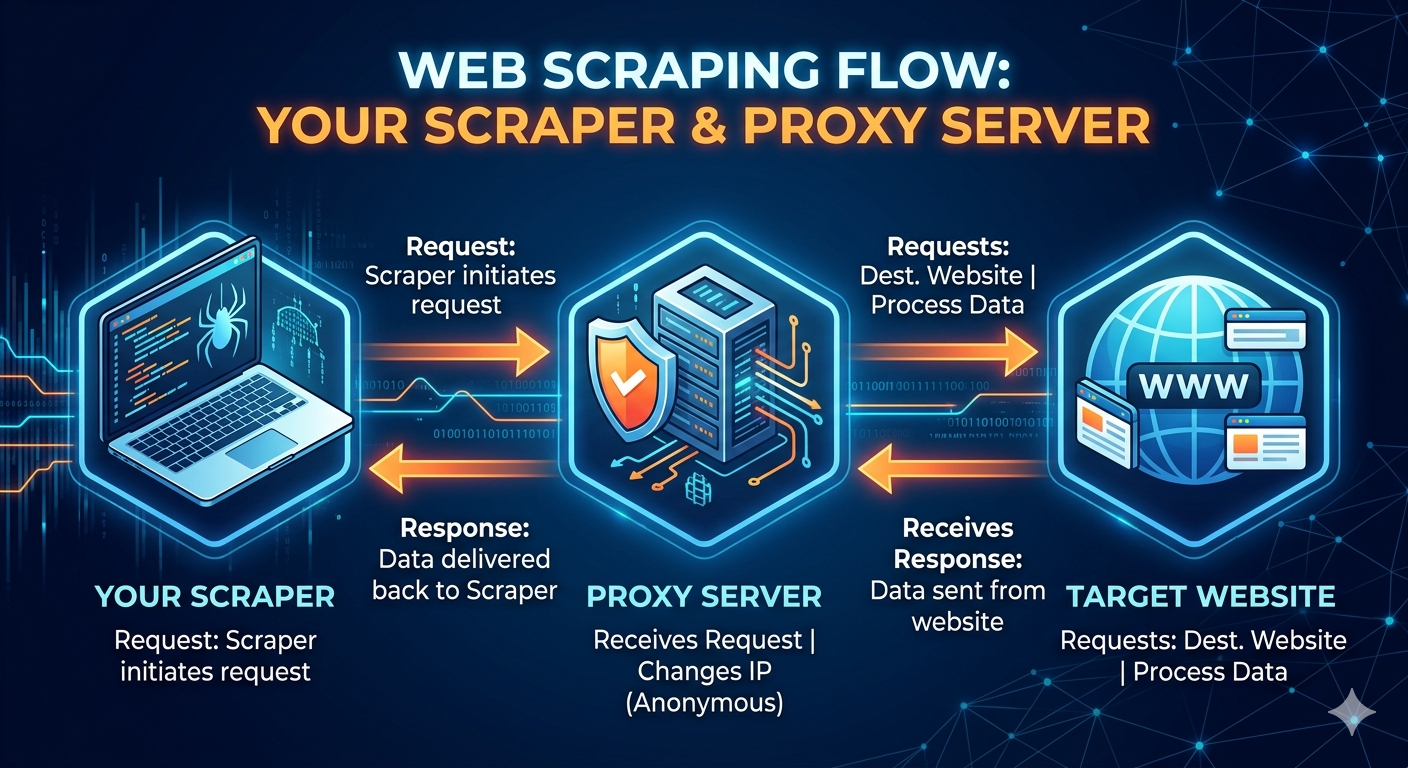
This gives you two main advantages. First, you can distribute your requests across many different IP addresses so no single IP triggers rate limits. Second, you can make requests appear to come from different geographic locations, which matters for sites that serve different content by region or block requests from certain countries (or from known datacenter IP ranges).
Types of proxies
Not all proxies are created equal, and the differences matter a lot for scraping. Here’s the breakdown:
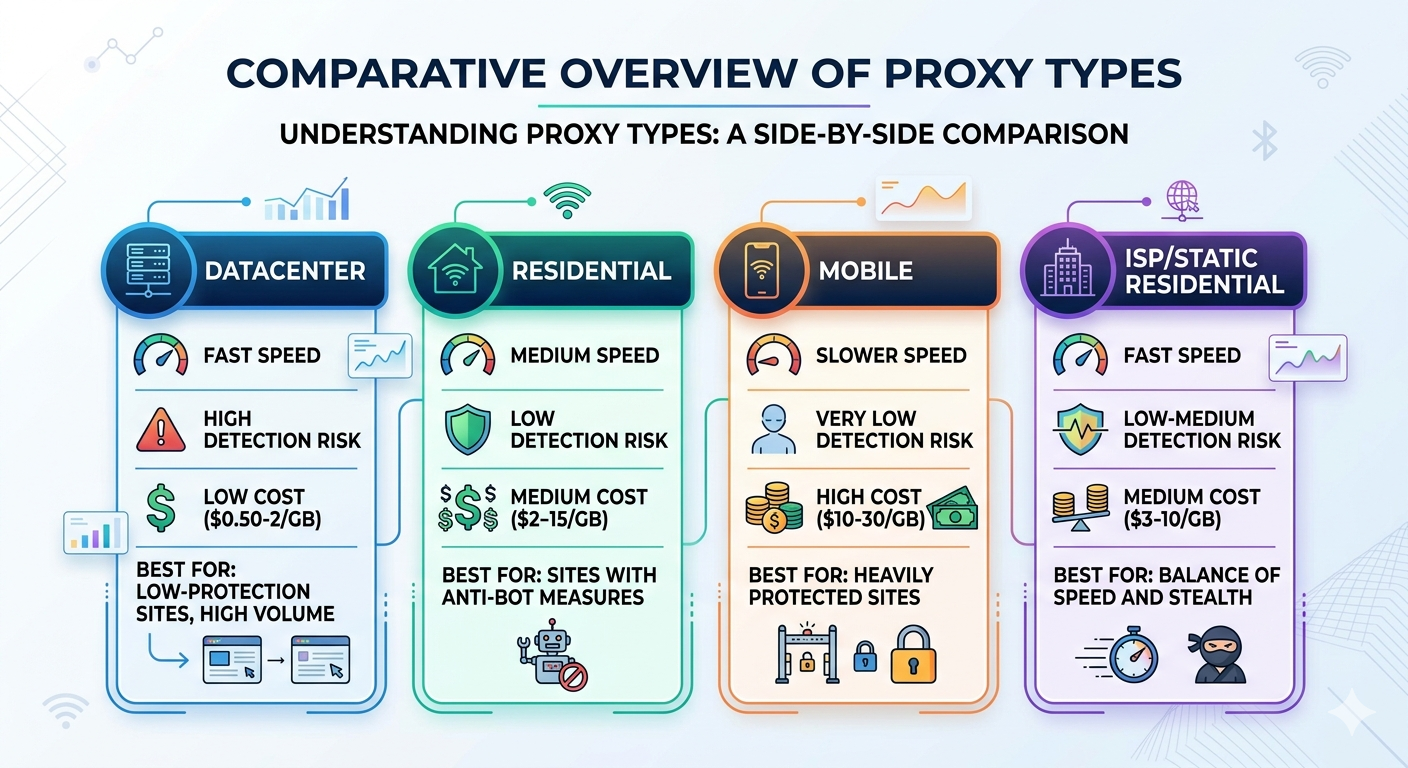
Datacenter proxies are IP addresses that belong to servers in data centers (AWS, Google Cloud, etc.). They’re fast and cheap, but many websites can identify datacenter IP ranges and block them outright. If a site sees a request coming from an AWS IP address, it’s a pretty safe bet that it’s not a regular person browsing the web. These work fine for sites with minimal bot detection, but they’ll get flagged quickly on anything with Cloudflare or similar protection.
Residential proxies use IP addresses assigned by real ISPs to real households. When a website sees traffic from a residential IP, it looks like a normal person on their home internet connection. These are significantly harder for sites to detect and block, but they cost more and are generally slower than datacenter proxies. They’re the go-to choice for scraping sites with serious anti-bot measures.
Mobile proxies route traffic through IP addresses assigned to mobile carriers (AT&T, Verizon, T-Mobile, etc.). These are the hardest to block because mobile carriers use shared IP pools - blocking a single mobile IP could affect thousands of legitimate users, so websites are very reluctant to do it. They’re the most expensive option but the most resilient against blocking.
ISP proxies (sometimes called static residential) are a hybrid - they’re datacenter-hosted IPs that are registered under residential ISPs. You get the speed of datacenter proxies with the classification of residential IPs. They’re a good middle ground for many use cases.
Here’s a rough comparison:
Setting up your own proxy
Before paying for a proxy service, it’s worth knowing you can set up your own. If you have a VPS or cloud server, you can run a simple proxy with something like Squid or Tinyproxy:
1
2
3
4
5
# on an Ubuntu VPS
sudo apt install tinyproxy
sudo nano /etc/tinyproxy/tinyproxy.conf
# set the port and allow your IP
sudo systemctl restart tinyproxy
Then use it from your scraper:
1
2
3
4
5
proxies = {
    "http": "http://your-vps-ip:8888",
    "https": "http://your-vps-ip:8888",
}
response = requests.get(url, proxies=proxies)
The limitation is obvious - you only have one IP address per server. You could spin up multiple cheap VPS instances across different providers and regions to build a small pool, but you’re essentially building your own proxy infrastructure at that point. For small projects or personal use this can work fine, but once you need dozens or hundreds of IPs, it makes more sense to use a proxy provider.
You can also use SSH tunneling as a quick-and-dirty proxy if you have access to a remote machine:
1
2
# create a SOCKS proxy through SSH
ssh -D 1080 -N user@your-remote-server
1
2
3
4
5
proxies = {
    "http": "socks5://127.0.0.1:1080",
    "https": "socks5://127.0.0.1:1080",
}
response = requests.get(url, proxies=proxies)
This is great for ad-hoc scraping from a different IP or geographic location, but not practical for rotating across many IPs.
Proxy providers
When you need real scale - rotating IPs, residential pools, geographic targeting - you’re looking at commercial proxy providers. The market has matured a lot and there are quite a few solid options. Here are some of the more established ones I’ve come across:
Bright Data (formerly Luminati) is probably the biggest name in the space. They have the largest proxy pool - over 72 million residential IPs according to their marketing. They offer all proxy types (datacenter, residential, mobile, ISP) and have additional tools like a scraping browser and pre-built datasets. The pricing is usage-based and can get expensive, but the network is very reliable. As I mentioned at the top of this post, they had a major presence at the AI Agent Conference.
Oxylabs is another major player with a large residential pool (100M+ IPs). They’re known for good documentation and enterprise-grade reliability. They also offer a “Web Scraper API” that handles proxy rotation, retries, and JavaScript rendering for you - you just send them a URL and get back the data. Pricing is similar to Bright Data.
Smartproxy is popular for offering a good balance of features and price. Their residential pool is smaller than Bright Data or Oxylabs, but still substantial (55M+ IPs), and their pricing tends to be more accessible for smaller projects. They have subscription plans starting around $30/month which makes them a reasonable entry point.
ScraperAPI takes a different approach - instead of giving you raw proxies, they provide an API where you send a URL and they handle proxy rotation, CAPTCHAs, and browser rendering behind the scenes. It’s simpler to use but less flexible. Good if you want to avoid managing proxy infrastructure entirely.
ScrapingBee is similar to ScraperAPI in concept - an API-first approach where they manage the proxy and rendering infrastructure. They have a generous free tier (1,000 API calls) that’s great for testing.
Most of these providers offer two pricing models: pay-per-GB (you pay for bandwidth consumed) or pay-per-request (through their scraping APIs). Pay-per-GB is more cost effective if you’re doing lots of small requests. Pay-per-request is simpler to budget for and makes sense if individual pages are large or if you want the provider to handle retries and rendering.
Using proxies with requests
The basic pattern with the requests library is straightforward:
1
2
3
4
5
6
7
8
import requests

# single proxy
proxies = {
    "http": "http://username:password@proxy-host:port",
    "https": "http://username:password@proxy-host:port",
}
response = requests.get("https://example.com", proxies=proxies)
Most commercial proxy providers give you a single gateway endpoint that automatically rotates IPs on each request. For example, with Bright Data it looks something like:
1
2
3
4
5
6
7
8
proxies = {
    "http": "http://username:password@brd.superproxy.io:22225",
    "https": "http://username:password@brd.superproxy.io:22225",
}

# each request automatically gets a different IP
for url in urls:
    response = requests.get(url, proxies=proxies)
If you’re managing your own pool of proxies, here’s a rotation class similar to the UserAgentManager from earlier:
1
2
3
4
5
6
7
8
9
10
11
12
13
14
15
16
17
18
19
20
21
22
23
24
25
26
27
28
29
30
31
32
33
34
35
36
37
38
39
40
41
42
43
44
45
46
import random
import requests

class ProxyRotator:
    def __init__(self, proxy_list):
        self.proxies = proxy_list
        self._last_used = None
        self._failures = {}

    def get(self):
        """Get a proxy, avoiding the last used one and any with recent failures."""
        available = [
            p for p in self.proxies
            if p != self._last_used and self._failures.get(p, 0) < 3
        ]
        if not available:
            # reset failures if we've exhausted all proxies
            self._failures.clear()
            available = self.proxies

        proxy = random.choice(available)
        self._last_used = proxy
        return {"http": proxy, "https": proxy}

    def mark_failed(self, proxy_url):
        """Track a proxy failure for rotation decisions."""
        self._failures[proxy_url] = self._failures.get(proxy_url, 0) + 1

    def mark_success(self, proxy_url):
        """Reset failure count on success."""
        self._failures.pop(proxy_url, None)

# usage
rotator = ProxyRotator([
    "http://user:pass@proxy1:port",
    "http://user:pass@proxy2:port",
    "http://user:pass@proxy3:port",
])

for url in urls:
    proxy = rotator.get()
    try:
        response = requests.get(url, proxies=proxy, timeout=30)
        rotator.mark_success(proxy["http"])
    except requests.RequestException:
        rotator.mark_failed(proxy["http"])
Using proxies with Playwright
For browser-based scraping with Playwright, you configure the proxy at the browser or context level:
1
2
3
4
5
6
7
8
9
10
11
12
13
14
15
from playwright.sync_api import sync_playwright

with sync_playwright() as p:
    browser = p.chromium.launch(
        headless=True,
        proxy={
            "server": "http://proxy-host:port",
            "username": "user",
            "password": "pass",
        }
    )
    page = browser.new_page()
    page.goto("https://example.com")
    content = page.content()
    browser.close()
If you need to rotate proxies across different pages, create a new browser context for each proxy:
1
2
3
4
5
6
7
8
9
10
11
12
13
14
with sync_playwright() as p:
    browser = p.chromium.launch(headless=True)

    for url in urls:
        proxy_config = rotator.get()
        context = browser.new_context(proxy={
            "server": proxy_config["http"],
        })
        page = context.new_page()
        page.goto(url)
        # ... extract data ...
        context.close()

    browser.close()
Strategies and trade-offs
There’s no one-size-fits-all approach with proxies. Here’s how I think about the trade-offs:
Start without proxies. Seriously. If you’re scraping a few hundred pages from a site with no bot protection, you probably don’t need proxies at all. Add reasonable delays, use a proper User-Agent, and you’ll be fine. Don’t add complexity until you actually need it.
Use a single rotating proxy gateway for most jobs. The commercial providers’ rotating gateways are the easiest path. You get a single endpoint, every request gets a different IP, and you don’t have to manage anything. The cost is higher per-GB, but the time saved is usually worth it.
Match the proxy type to the target. Datacenter proxies for easy sites, residential for anything with Cloudflare or similar protection, mobile for the really tough cases. There’s no point paying residential prices to scrape a site that doesn’t even check IPs.
Watch your bandwidth. Residential proxies at $10/GB add up fast if you’re downloading large pages or images. Strip out what you don’t need, avoid downloading assets (images, CSS, fonts) when possible, and compress responses when the server supports it.
Geographic targeting matters. If you’re scraping a US e-commerce site, use US-based proxies. Many sites serve different content, pricing, or availability by region, and some block foreign traffic entirely. Most providers let you target specific countries or even cities.
Budget for failures. Not every request through a proxy will succeed. Residential proxies especially can be flaky - the underlying connection might drop, the IP might already be flagged, or the proxy might be slow. Build retry logic and expect maybe 5-15% of requests to need retrying, which means you’re paying for that extra bandwidth too.
Storing scraped data
Once you’ve got the data, you need somewhere to put it. Here are the approaches I use most.
CSV for simple datasets
For quick scraping jobs where I just need to look at the data in a spreadsheet:
1
2
3
4
5
6
7
8
9
10
11
import csv

def save_to_csv(items, filename):
    if not items:
        return

    keys = items[0].keys()
    with open(filename, "w", newline="", encoding="utf-8") as f:
        writer = csv.DictWriter(f, fieldnames=keys)
        writer.writeheader()
        writer.writerows(items)
SQLite for anything recurring
If I’m going to be running a scraper more than once, I almost always use SQLite. It’s zero-config, handles concurrent reads fine, and makes it easy to track what you’ve already scraped:
1
2
3
4
5
6
7
8
9
10
11
12
13
14
15
16
17
18
19
20
21
22
import sqlite3

def init_db(db_path):
    conn = sqlite3.connect(db_path)
    conn.execute("""
        CREATE TABLE IF NOT EXISTS products (
            id INTEGER PRIMARY KEY AUTOINCREMENT,
            url TEXT UNIQUE,
            name TEXT,
            price REAL,
            scraped_at TIMESTAMP DEFAULT CURRENT_TIMESTAMP
        )
    """)
    conn.commit()
    return conn

def save_product(conn, product):
    conn.execute("""
        INSERT OR REPLACE INTO products (url, name, price)
        VALUES (?, ?, ?)
    """, (product["url"], product["name"], product["price"]))
    conn.commit()
The UNIQUE constraint on the URL means I can re-run the scraper without worrying about duplicates, and the scraped_at timestamp lets me track freshness.
JSON for nested/complex data
When the data has nested structures that don’t fit neatly into rows and columns:
1
2
3
4
5
import json

def save_to_json(items, filename):
    with open(filename, "w", encoding="utf-8") as f:
        json.dump(items, f, indent=2, ensure_ascii=False)
Putting it all together
Here’s a more complete example that ties together the patterns above. This scraper handles pagination, rate limiting, error recovery, and saves to SQLite:
1
2
3
4
5
6
7
8
9
10
11
12
13
14
15
16
17
18
19
20
21
22
23
24
25
26
27
28
29
30
31
32
33
34
35
36
37
38
39
40
41
42
43
44
45
46
47
48
49
50
51
52
53
54
55
56
57
58
59
60
61
62
63
64
65
66
67
68
69
70
71
72
73
74
75
76
77
78
79
80
81
82
83
84
85
86
87
88
89
90
91
92
93
94
95
96
97
98
99
100
101
102
103
104
import requests
from bs4 import BeautifulSoup
import sqlite3
import time
import random
import logging

logging.basicConfig(level=logging.INFO)
logger = logging.getLogger(__name__)

class ProductScraper:
    def __init__(self, db_path="products.db"):
        self.session = requests.Session()
        self.session.headers.update({
            "User-Agent": "Mozilla/5.0 (Macintosh; Intel Mac OS X 10_15_7) "
                          "AppleWebKit/537.36 Chrome/120.0.0.0 Safari/537.36"
        })
        self.conn = sqlite3.connect(db_path)
        self._init_db()

    def _init_db(self):
        self.conn.execute("""
            CREATE TABLE IF NOT EXISTS products (
                id INTEGER PRIMARY KEY AUTOINCREMENT,
                url TEXT UNIQUE,
                name TEXT,
                price TEXT,
                description TEXT,
                scraped_at TIMESTAMP DEFAULT CURRENT_TIMESTAMP
            )
        """)
        self.conn.commit()

    def _polite_get(self, url, retries=3):
        for attempt in range(retries):
            try:
                time.sleep(random.uniform(1, 5))
                response = self.session.get(url, timeout=30)
                response.raise_for_status()
                return response
            except requests.RequestException as e:
                logger.warning(f"Attempt {attempt + 1} failed for {url}: {e}")
                if attempt == retries - 1:
                    raise
                time.sleep(5 * (attempt + 1))  # backoff

    def _parse_product(self, card):
        return {
            "url": card.select_one("a")["href"] if card.select_one("a") else "",
            "name": self._safe_text(card, ".product-name"),
            "price": self._safe_text(card, ".product-price"),
            "description": self._safe_text(card, ".product-description"),
        }

    def _safe_text(self, element, selector):
        found = element.select_one(selector)
        return found.text.strip() if found else ""

    def _save_product(self, product):
        self.conn.execute("""
            INSERT OR REPLACE INTO products (url, name, price, description)
            VALUES (?, ?, ?, ?)
        """, (product["url"], product["name"],
              product["price"], product["description"]))
        self.conn.commit()

    def scrape(self, base_url):
        page = 1
        total = 0

        while True:
            url = f"{base_url}?page={page}"
            logger.info(f"Scraping {url}")

            response = self._polite_get(url)
            soup = BeautifulSoup(response.text, "lxml")

            cards = soup.select(".product-card")
            if not cards:
                break

            for card in cards:
                product = self._parse_product(card)
                self._save_product(product)
                total += 1

            logger.info(f"Page {page}: {len(cards)} products (total: {total})")

            if not soup.select_one("a.next-page"):
                break
            page += 1

        logger.info(f"Done. Scraped {total} products across {page} pages.")

    def close(self):
        self.conn.close()
        self.session.close()

if __name__ == "__main__":
    scraper = ProductScraper()
    try:
        scraper.scrape("https://example.com/products")
    finally:
        scraper.close()
A note on ethics and legality
I’d be irresponsible if I didn’t mention this. Web scraping exists in a gray area, and it’s worth thinking about before you start a project:
- Check the Terms of Service. Some sites explicitly prohibit scraping. That doesn’t necessarily make it illegal everywhere, but it’s worth knowing.
- Respect robots.txt. It’s not legally binding in most jurisdictions, but it represents the site owner’s wishes.
- Don’t overload servers. This is both ethical and practical. A small site running on a shared host can be genuinely impacted by aggressive scraping.
- Be careful with personal data. Scraping publicly available data is generally different from scraping personal information. GDPR and similar regulations apply.
- Consider the API first. If a site offers an API, use it. It’s more reliable, more respectful, and usually gives you better data.
I’ve always tried to follow a simple rule: scrape the way you’d want someone to scrape your site. Be polite, don’t take more than you need, and if the site owner asks you to stop, stop.
What I’ve learned
After years of scraping projects, here are the things I wish I’d known from the start:
- Start simple. Don’t reach for Selenium or Playwright until you’ve confirmed that requests + BeautifulSoup can’t handle it. Check the page source in your browser - if the data is in the HTML, you don’t need a headless browser.
- Check for APIs first. Open your browser’s network tab and watch the XHR requests. Many “dynamic” sites actually load data from JSON APIs that you can call directly, which is way easier and faster than parsing HTML.
- Build incrementally. Get one page working before worrying about pagination, error handling, or data storage. Layer complexity as you need it.
- Monitor your scrapers. If a scraper runs on a schedule, add alerting so you know when it breaks. They always break eventually.
- Cache raw responses during development. Save the HTML to disk so you’re not hitting the server every time you tweak your parsing code. Your development loop gets much faster, and you’re nicer to the server.
1
2
3
4
5
6
7
8
9
10
11
12
13
14
15
16
17
18
19
20
import hashlib
import os

def cached_get(url, session, cache_dir="cache"):
    """Cache responses to disk during development."""
    os.makedirs(cache_dir, exist_ok=True)
    cache_key = hashlib.md5(url.encode()).hexdigest()
    cache_path = os.path.join(cache_dir, f"{cache_key}.html")

    if os.path.exists(cache_path):
        with open(cache_path, "r", encoding="utf-8") as f:
            return f.read()

    response = session.get(url)
    response.raise_for_status()

    with open(cache_path, "w", encoding="utf-8") as f:
        f.write(response.text)

    return response.text
Web scraping is one of those skills that just keeps paying dividends. Once you’re comfortable with it, the entire web becomes your dataset. Just remember to be a good neighbor while you’re at it.